File Storage Locations
Define the path and names of the temporary and permanent file
storage locations on your PC.
- On the Accelerator Downloads menu, select Options/Configurations.
The Configuration window appears.
- Under the Configuration tree, click General to display the
General configuration form.
- The downloaded files permanent storage location is defined in
the box Default Download Directory. Use the Browse button to change
the location.
- . The downloaded files temporary storage location is defined
in the box Temporary Directory. Use the Browse button to change
the location.
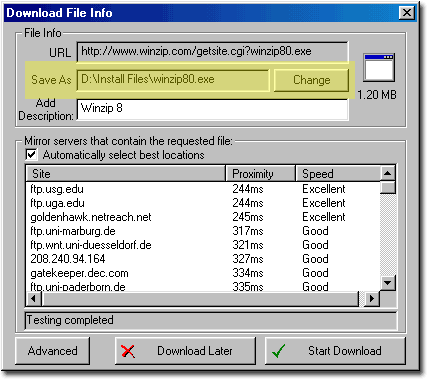
- Use your browser to access the desired site and click on the
file to be downloaded. The Accelerator Download File Info dialog
appears.
The Save As box shows the location in which the file will be saved
(click Change to define a new path). You may add a file description
in the Add Description box.
|