200 million users can't be wrong!

DAP Help
File Types
Download Accelerator Plus, is configured by default to download the most common file types. However, as new file types become available, it is necessary to define their extensions to enable DAP to identify them.
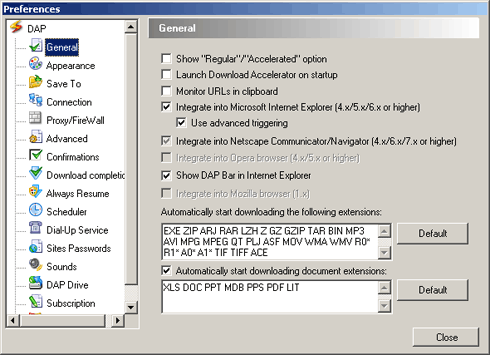
- In DAP's main window, select the 'Tools' menu and choose 'Options'. DAP's configuration window will appear.
- On the configuration page, click 'General' to display the 'General' window.
- The extensions of the file types that are automatically downloaded appear. You may delete any of the extensions, or add new ones by entering an alphanumeric string in capital letters with a single space between each type of extension.
Search SpeedBit Help:

Custom Search
Reviews and Awards:


The world leader in
Acceleration Technology


Our Users Say:

Custom Search