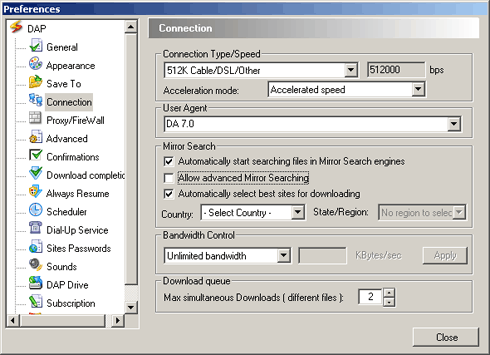
Download Accelerator Plus is configured by default
to locate various sites in which your file can be found
and then select the best sites for downloading. File
segments are then downloaded simultaneously from these
mirror sites.
If you want to download files from a specific site
you may override the default mirror search and download
options.
To modify the Mirror Search settings:
- In DAP's main window, select the Options menu and choose Preferences. The preferences window appears.
- Under the Configuration tree, choose the Connection
option to display the Connection configuration window.
- Under Mirror Search, set the options
as desired.
- Automatically start searching
for file(s) in mirror search engines: DAP will
search for the file and will display a list of all the servers from which it
can be downloaded automatically.
- Allow advanced mirror searching
- Automatically select best sites for downloading:
DAP automatically chooses the fastest server to
respond (the one with the shortest
ping). To download a file from another server, simply
select that server and press the Download Now button.
- Country/State selection: define your locale for
better proximity results.
|