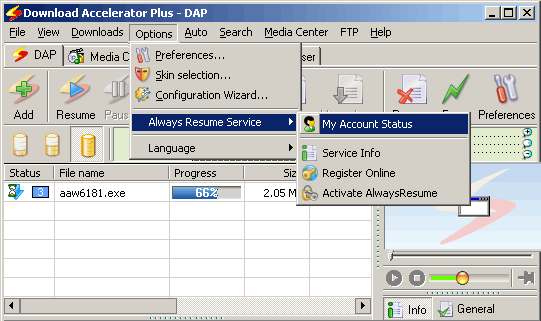
Always Resume is a DAP service that enables you
to resume downloads, even from servers that do not support
this feature.
To use this option select the Register Online option
from the Always Resume service located in the Options
menu.
As you can see there are three sections in the Always
Resume menu:
- My Account Status: View
your Always Resume account status, including, for instance
how much remaining bandwidth you have available, etc.
- Service Info: Learn more about the Always
Resume Service.
- Register Online: Choose from the variety of
Always Resume packages according to your needs.
- Activate Always Resume: Enter your account
details to enjoy the benefits of the Always Resume
service.
|
You can view your account status, general information
about the service, register and activate your account from
the 'Options' menu.
In order to use the Always Resume service, you
must be registered for one of Speedbit's service
packages. |